
 Genera
How to get your customer data out of Pawtul

- 1CSVAsk Pawtul for your fileEmail dpo@pawtul.com for a CSV. Pawtul has a month to send it.
- 2CSVGeneraUpload it to GeneraImport owners reads CSV and Excel files, and you match the columns on screen.
- 3Cancel Pawtul Pro lastOnly once your file has arrived and opens.
Short answer
Pawtul's own pages describe no export button, so email dpo@pawtul.com and ask for your clients, pets, bookings and invoices as CSV files. Its GDPR page says the copy comes within one month, free, so cancel Pawtul Pro only once your file has arrived and opens.
- On request no export button described
- 1 month for Pawtul to send your copy
- Monthly Pawtul Pro in the app
Ask Pawtul for your data
- 1Email dpo@pawtul.com from the email address on your Pawtul account
- 2Ask for your clients and your pets as CSV files, with your bookings and invoices too
- 3Keep Pawtul's reply
Hello, I use Pawtul for my business, [business name], and my account email is [email]. As the data controller for my clients' details, please send me a copy of my business's data as CSV files: every client with their contact details and address, every pet with its owner, breed, date of birth, microchip number, vet, vaccinations and notes, my bookings from today onwards, and my invoices and payments. Thank you, [your name]
Pawtul's contact page lists hello@pawtul.com and a WhatsApp number, and says the team replies within 24 hours. Its FAQ page says the written instructions are out of date and points people to WhatsApp for help.
Keep what is not in the file
Pawtul's pages describe no download for pet photos, pet reports or walk routes. Ask for them in the same email, and screenshot any you want to keep before you cancel.
In Genera, every dog has a Documents tab for old forms, agreements and vet letters. You upload PDFs, photos or Word files, or photograph a paper form, and owners don't see them.
Before you leave Pawtul
- 1On your iPhone, open Settings and tap your name
- 2Tap Subscriptions, then tap the Pawtul subscription
- 3Tap Cancel Subscription
Do this last, once your file has arrived and opens. The App Store sells Pawtul Pro inside the app as Pawtul Pro Monthly, so Apple handles the subscription. If you pay Pawtul another way, ask hello@pawtul.com how to cancel, because its terms don't describe it.
No download button for any of it

- Clients and petsOnly on request, from dpo@pawtul.com
- Bookings and invoicesAsk for them in the same email
- Pet photos and pet reportsNo download described
- Walk routesNo download described
Good to know
Pawtul's plans and billing
Pawtul's website lists Pro at £12.99 a month, for the mobile app only, and Enterprise at £39.99 a month for desktop and web, marked coming soon. It says existing customers keep the older platform while Enterprise is rebuilt.
The App Store lists one purchase inside the app, Pawtul Pro Monthly at £12.99. Pawtul's terms set no notice period, and they are governed by the law of England and Wales. Pawtul LTD is registered in England and Wales as company 14353586.
Your clients' details are your records
Pawtul's GDPR page says Pawtul is the data processor for its business customers, and each business is the data controller for its clients' data.
The same page says you can ask for your data in a structured, machine readable format such as CSV or JSON, and that Pawtul can send it straight to another provider if that is technically possible.
What happens to your data after you leave Pawtul
Pawtul's GDPR page says business customer data is kept for the length of the business relationship plus 7 years for financial records. Its privacy policy says data is held only as long as it is needed or until you ask for it to be deleted, and that deleted data may stay on backups for legal, tax or regulatory reasons.
Once you have your copy, you can ask for deletion by emailing dpo@pawtul.com.

We move you over
Bring your Pawtul customers into Genera
We built Genera to look after Duncan's Dog Co, our licensed daycare in Surrey. When a home boarder or dog walker comes to us from Pawtul, this is how the move works.
- 1You upload your Pawtul export yourself.Inside your Genera account, you bring in owners and their pets from a CSV or Excel file, with names, contact details, address, breed, date of birth, microchip and notes. Your column headings don't need to match ours, because you line them up on screen, so nobody has to type every dog in again. If your customers are in QuickBooks or Xero, you can bring them straight from there.
- 2Nobody gets an email until you are ready.Owners go in without a portal invite. When you want them on board, one button invites everyone who hasn't got access yet.
- 3You keep Pawtul going while you try Genera.Wait for your file before you cancel. The 30 day free trial has every feature switched on, with no card to start.
- 4Bookings start in Genera.Owners and pets come across, and bookings don't, so each owner books their regular days in Genera once they have their invite.
- 5Payments go to you.Owners pay by card or Direct Debit through your own Stripe or GoCardless account, whichever you switch on, or by bank transfer. Direct Debits don't move across from another system. If you switch Direct Debit on, owners set it up before they can make their first booking, so there are no reminders to chase.
This is what it looks like in Genera
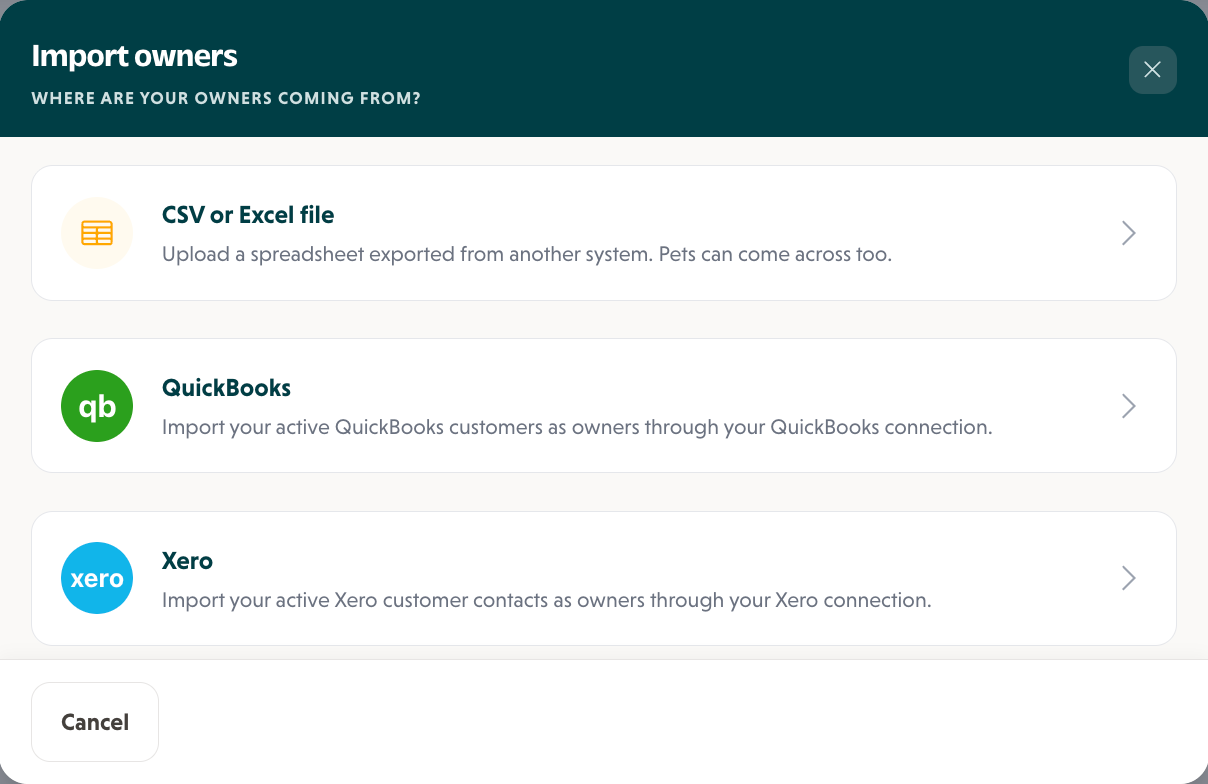
1On the Owners page, click Import owners and choose where your owners are coming from.
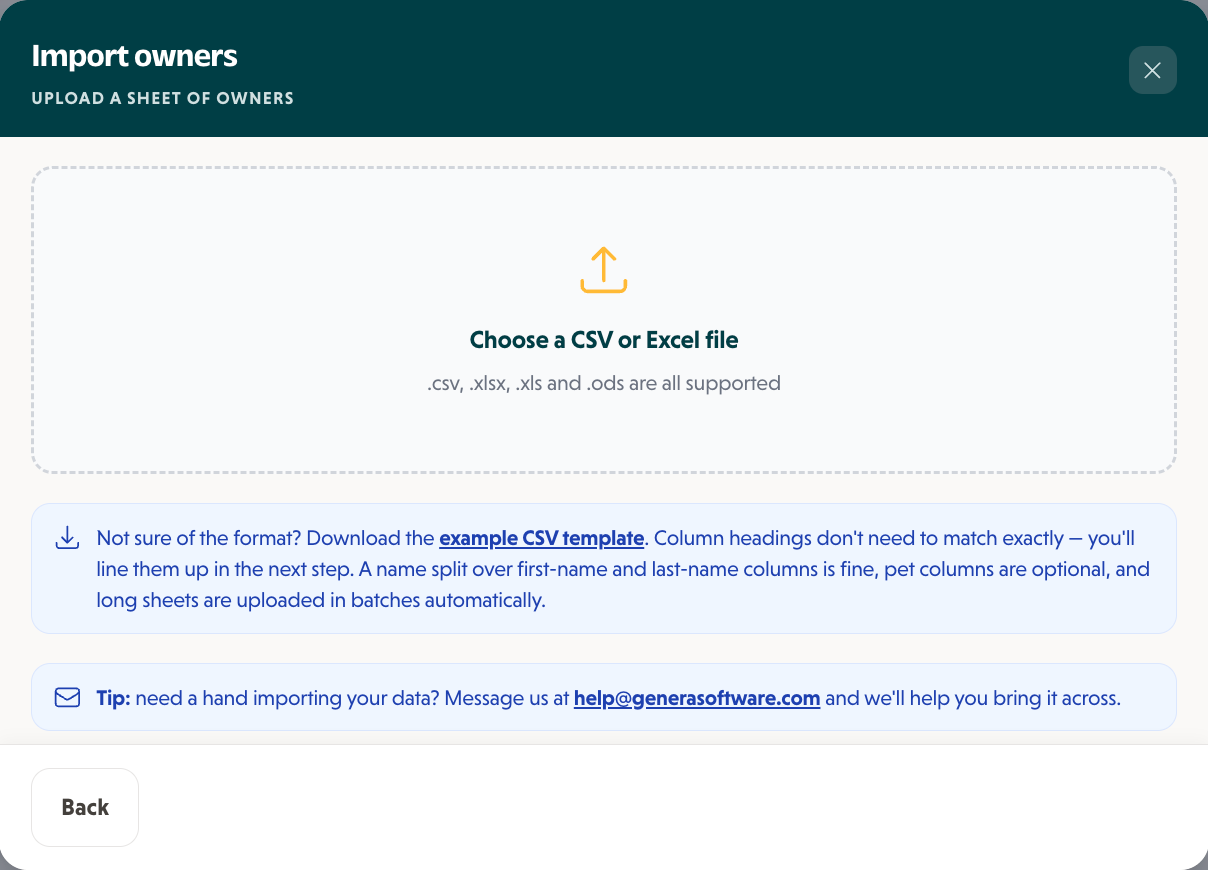
2Drop in your export. CSV and Excel files both work, and there is a template if you want one.
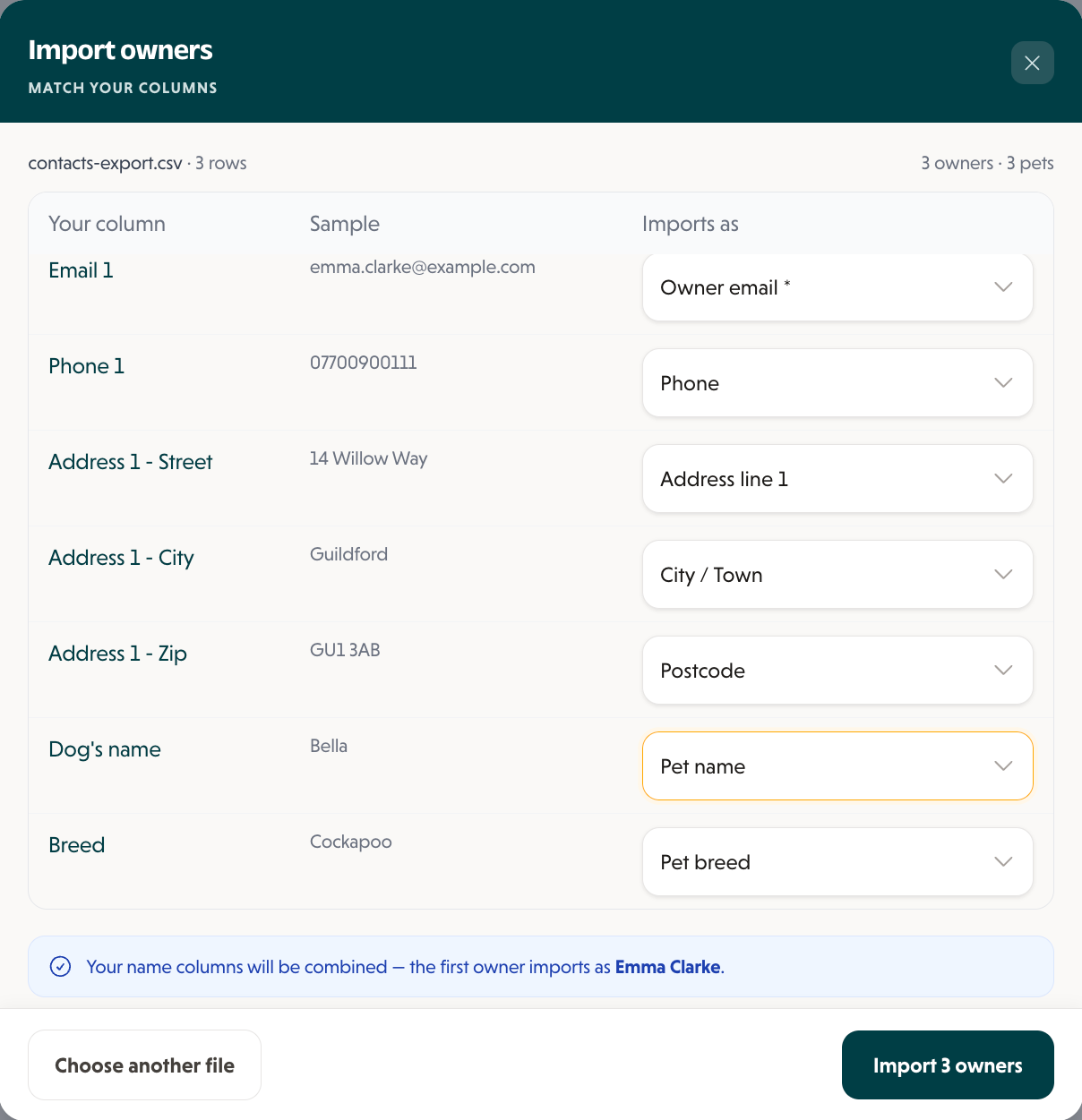
3Match your columns to Genera's. It joins first and last names for you and counts the owners and pets.

When you are ready, Invite owners without portal emails every owner who hasn't got a login yet. Export CSV downloads every owner and pet, in the same layout the import reads.
Plans are £50, £75 or £99 a month, with no setup fee and no contract.
A hand with the file? Email help@generasoftware.com

Questions people ask
QCan I export my clients from Pawtul?
QHow long does Pawtul take to send my data?
QHow do I cancel Pawtul Pro?
QCan Pawtul send my data straight to Genera?
QCan I get my pet photos and pet reports out of Pawtul?
Sources
Duncan
Founder of Genera and owner of Duncan's Dog Co
Duncan has run Duncan's Dog Co, a licensed dog daycare in Surrey, since 2011. Genera is the software he built to run it, shaped by what actually works day to day, not theory.
Moving from another system?
- The planHow to switch without losing a booking
- Switching guideLeaving Wix Bookings
- Switching guideLeaving Revelation Pets
- Switching guideLeaving Pet Sitter Plus
- Switching guideLeaving Collar
- Switching guideLeaving KennelBooker
- Switching guideLeaving ProPet
- Switching guideLeaving My Pet Walker
- Switching guideLeaving Gingr
- Switching guideLeaving Time To Pet