How to export your customer data from Time To Pet
Short answer
Time To Pet lets you download your clients and your pets as CSV files from the bottom of the Client List, and your keys and vets the same way. Your visits come out of the Schedule reports, and your payments from Invoicing. There is no contract, so you can cancel from Billing whenever you are ready, but download everything first, because you cannot get into the account once it is cancelled.
- No contract
- 12 months
- Re-add
Download your data
- 1Open the Client List and scroll to the bottom
- 2Click Export Client Data
- 3Tick every field you want, and include inactive clients
- 4Click Export Data at the bottom right
- 1On the same Client List, click Export Pet Data
- 2Include pets of inactive clients, deceased pets and inactive pets if you want a full record
- 3Tick Client Fields as well
- 4Click Export Data
- 1Open Clients then Keys, tick Include Inactive Clients and click Export Key Data
- 2Open Clients then Vet List and click Export Vets
- 1Open Reporting then Schedule
- 2Open the Visits report and set dates that cover the visits already booked ahead
- 3Download it as a CSV
- 1Open Invoicing then Payments, choose your dates, click Refresh then Download
- 2Open Reporting then Financial for any revenue or sales report you want to keep
- 3Download single invoices as PDFs from the Edit Invoice screen
Before you leave Time To Pet
- 1Click your profile picture at the top right of the dashboard
- 2Choose Billing
- 3Click the red Cancel Account button and follow the prompts
Do this last. Once the account is cancelled you cannot log in to download anything.
Not in a spreadsheet
- Pet photosOne at a time from the Messages gallery, no bulk download
- InvoicesOne PDF at a time, no bulk download
- Vaccination recordsNo export described in the help centre
- Cards on fileClients add their card again
Good to know
Time To Pet's notice and billing
Time To Pet's pricing page says there are no contracts, and you can cancel at any time without a fee. You cancel yourself from Billing in the dashboard.
Its prices are shown in dollars, and its terms are governed by the laws of Texas.
What happens to your clients' cards on file
Time To Pet's help centre says card details are held by its payment provider, Stripe, and never on Time To Pet's own servers. Time To Pet keeps a link to the card, not the card itself, and it does not describe any way to move saved cards to another system.
Plan for clients adding their card again in your new system.
What happens to your data after you leave Time To Pet
Time To Pet's help centre says a cancelled account's data is kept for up to 12 months, and recommends exporting everything before you cancel. If you want the data deleted sooner, email support@timetopet.com from the address on the account.
Its terms say that if Time To Pet ends your access, it will make reasonable efforts to send basic client, pet, key, vet and schedule lists if you ask in writing within 7 business days.
We move you over
Bring your Time To Pet customers into Genera
We built Genera to look after Duncan's Dog Co, our licensed daycare in Surrey. When a dog walker or pet sitter comes to us from Time To Pet, this is how the move works.
- 1You upload your Time To Pet export yourself.Inside your Genera account, you bring in owners and their pets from a CSV or Excel file, with names, contact details, address, breed, date of birth, microchip and notes. Your column headings don't need to match ours, because you line them up on screen, so nobody has to type every dog in again. If your customers are in QuickBooks or Xero, you can bring them straight from there.
- 2Nobody gets an email until you are ready.Owners go in without a portal invite. When you want them on board, one button invites everyone who hasn't got access yet.
- 3You keep Time To Pet going while you try Genera.Take real bookings in Genera before you cancel. The 30 day free trial has every feature switched on, with no card to start.
- 4Bookings start in Genera.Owners and pets come across, and bookings don't, so each owner books their regular days in Genera once they have their invite.
- 5Payments go to you.Owners pay by card or Direct Debit through your own Stripe or GoCardless account, whichever you switch on, or by bank transfer. Direct Debits don't move across from another system. If you switch Direct Debit on, owners set it up before they can make their first booking, so there are no reminders to chase.
This is what it looks like in Genera
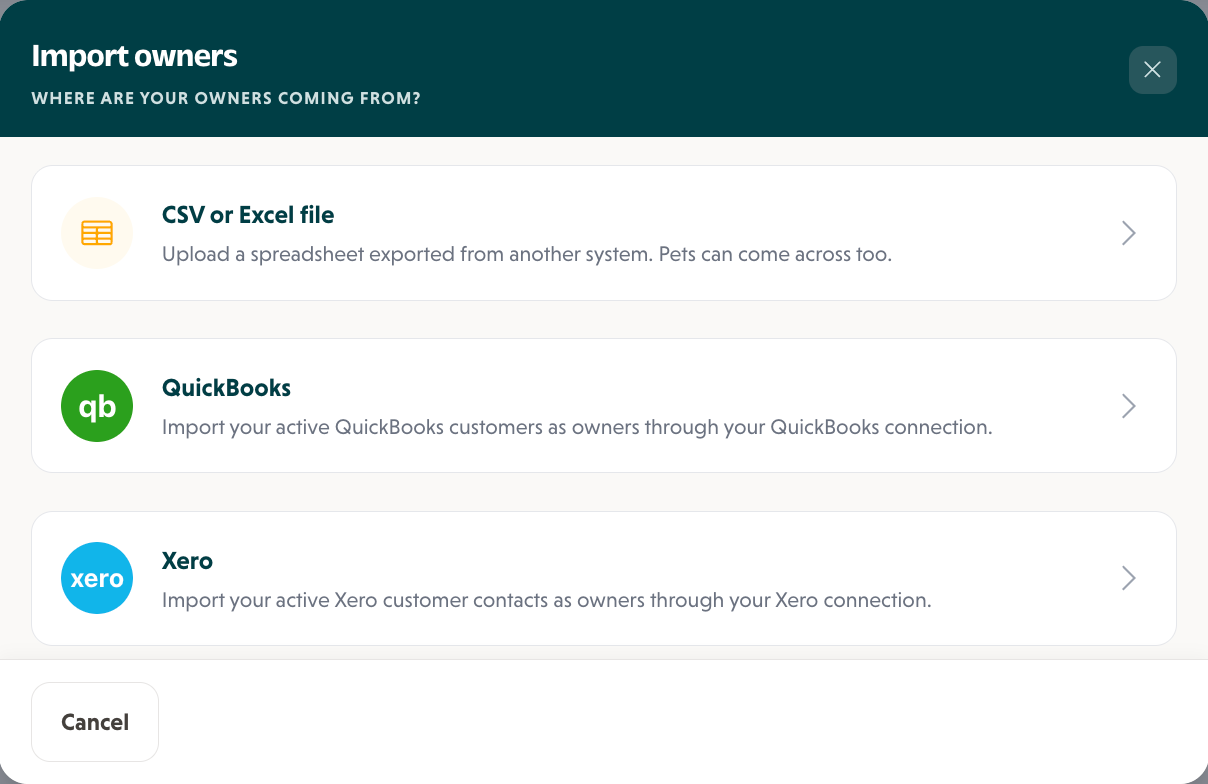
1On the Owners page, click Import owners and choose where your owners are coming from.
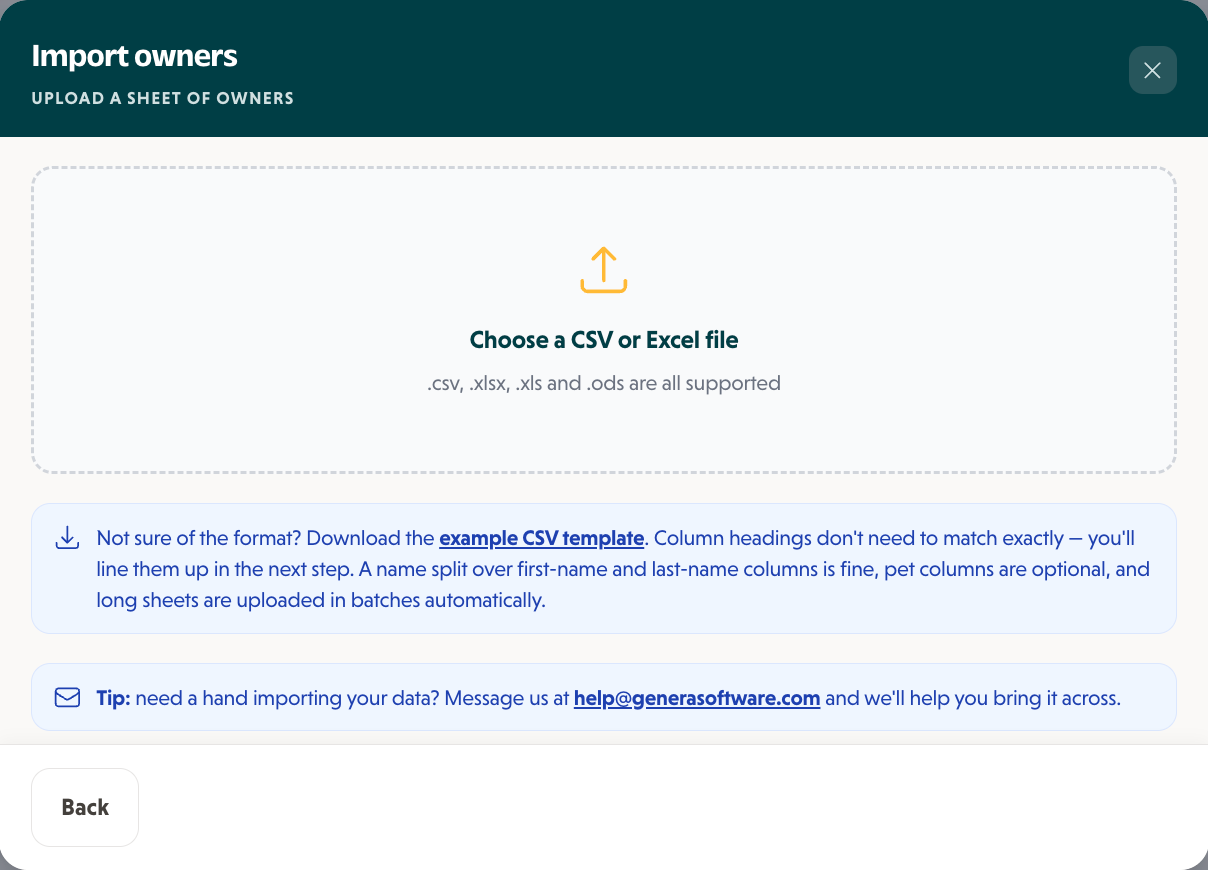
2Drop in your export. CSV and Excel files both work, and there is a template if you want one.
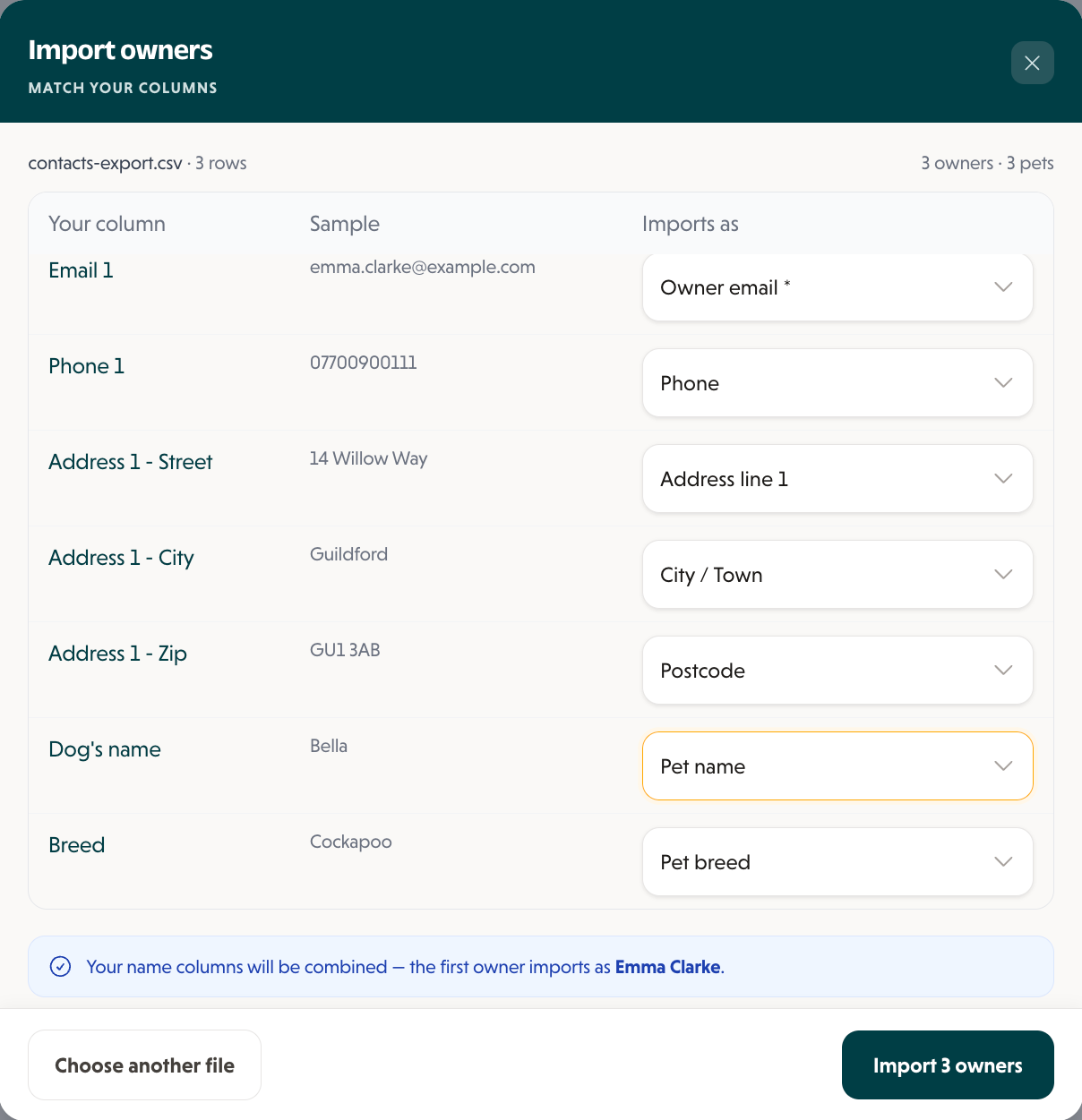
3Match your columns to Genera's. It joins first and last names for you and counts the owners and pets.

When you are ready, Invite owners without portal emails every owner who hasn't got a login yet. Export CSV downloads every owner and pet, in the same layout the import reads.
Plans are £50, £75 or £99 a month, with no setup fee and no contract.
A hand with the file? Email help@generasoftware.com
Questions people ask
QCan I export my clients from Time To Pet?
QDoes Time To Pet have a contract or notice period?
QWhat happens to my data when I cancel Time To Pet?
QWill my clients' cards move from Time To Pet?
QCan I export my pet photos from Time To Pet?
Sources
- Time To Pet help centre: Exporting data from Time To Pet
- Time To Pet help centre: Exporting pet data
- Time To Pet help centre: Can I pause my account and keep my data?
- Time To Pet help centre: Can I permanently delete data?
- Time To Pet help centre: Switching to Time To Pet Payments powered by Stripe
- Time To Pet: Pricing
- Time To Pet: Terms of use
Duncan
Founder of Genera and owner of Duncan's Dog Co
Duncan has run Duncan's Dog Co, a licensed dog daycare in Surrey, since 2011. Genera is the software he built to run it, shaped by what actually works day to day, not theory.
Moving from another system?
- The planHow to switch without losing a booking
- ComparedGenera and Time To Pet compared for UK dog businesses
- Switching guideLeaving Wix Bookings
- Switching guideLeaving Revelation Pets
- Switching guideLeaving Pet Sitter Plus
- Switching guideLeaving Collar
- Switching guideLeaving KennelBooker
- Switching guideLeaving ProPet
- Switching guideLeaving My Pet Walker
- Switching guideLeaving Gingr